
A Cybersecurity Readiness Guide for Business Leaders
An employee gets a text that reads like it came from the company’s CEO, traveling and in a hurry, asking for a quick round of gift cards for a client gesture and the codes sent over right away. Nothing about the tone looks unusual enough, on its own, to make the employee stop and check before acting, and that’s the point. Manufactured urgency is one of the most consistent tools in a social engineer’s kit, built specifically to close the window where verification would normally happen. Even the FBI’s own guidance on business email compromise tells businesses to be “especially wary if the requestor is pressing you to act quickly.”
This concluding piece of Cybersecurity Awareness Month, the fifth and final entry in 99Ten’s Racing the Zero-Day Clock series, turns to exactly that window, the one artificial intelligence is now working hardest to widen: the few seconds an employee has to read a text, answer a call, or scan a code, before any vulnerability, gap, or response plan the previous four articles covered ever comes into play.
Moments like that one, not a firewall rule or a patch schedule, are where a growing share of cybersecurity risk now lives for small and midsize businesses. The FBI’s Internet Crime Complaint Center received reports of $20.877 billion in losses in 2025, and business email compromise, the category of scam built entirely around impersonating someone the victim already trusts, accounted for 24,768 complaints and $3,046,598,558 in reported losses on its own. Those figures don’t describe a handful of unlucky companies. They describe a tactic that works often enough for attackers to keep running it at scale.
None of what follows requires turning employees into security analysts. It requires giving them a small set of habits, repeated often enough to become automatic, for the range of tactics attackers now use, increasingly sharpened by AI: a simulated phishing test that teaches pattern recognition rather than fear, a habit of verifying calls and messages that ask for something unusual, a healthy suspicion of the MFA prompt nobody requested, caution around QR codes and login pages, and a clear sense of what information is safe to share with someone who has not been verified. What ties all of it together is the same three-word discipline: recognize, verify, report. To help put that discipline into practice, this article closes with a downloadable checklist your team can start using right away.
Building the Habit with Simulated Phishing Tests
Phishing simulation training works on a simple premise: employees who have already seen a realistic fake, in a low-stakes setting, are less likely to be fooled by a real one. Security teams run these simulated phishing campaigns by sending employees fake phishing emails built to look like the real thing, specifically to teach them to be vigilant and to recognize the characteristics of an actual phishing attempt, rather than leaving that lesson to be learned for the first time during a real attack.
The part most businesses get wrong is treating the click rate as the entire scorecard. NIST’s Phish Scale, a rating system built by NIST researchers to grade how difficult a given phishing simulation actually is, exists because a low click rate can mean genuine awareness or it can mean the test was too easy or too obviously irrelevant to the people receiving it. As NIST researcher Michelle Steves has explained, the tool is “intended to help provide a deeper understanding of whether a particular phishing email is harder or easier for a particular target audience to detect.” A simulation that never varies in difficulty teaches employees to recognize one kind of trap, not the range of tactics they’ll actually face.
CISA’s Cross-Sector Cybersecurity Performance Goals treat the underlying cadence as a baseline control rather than an advanced practice. Goal 2.I calls for “at least annual trainings for all organizational employees and contractors that cover basic security concepts, such as phishing, business email compromise, basic operational security, password security,” with new employees receiving initial training “within 10 days of onboarding.” Cybersecurity training for employees that happens once, at hiring, and never again is not meeting that bar, and it is not preparing anyone for tactics that keep changing.
Suspicious Calls, Texts & the Vendor or Executive on the Other End
Phishing simulations reveal something counterintuitive: the same trick often succeeds more by phone or text than it does by email. The 2026 Verizon Data Breach Investigations Report found that the median successful “click” rate for mobile-centric vectors such as voice calls and text messages runs 40% higher than for email. An employee trained to scrutinize emails carefully may still wave through a phone call or a text simply because it hasn’t occurred to them that the same scrutiny applies there too.
The same report found that pretexting, the practice of fabricating a plausible scenario to manipulate someone into acting rather than simply asking them to click a link, reached 6% of all breaches, while phishing remained at 16%. Taken together, the two figures point to the same gap: training employees to recognize a phishing email does not automatically train them to recognize the same manipulation delivered by voice or text.
Business email compromise is the clearest example of why that gap matters. The FBI’s IC3 has tracked more than $55.4 billion in exposed domestic and international losses tied to the scam since 2013. The FBI’s own guidance for businesses is specific about the fix: look up the company’s phone number independently and call to verify any request to change payment details or wiring instructions, rather than trusting contact information supplied in the message itself. The habit costs an employee thirty seconds. The businesses in the loss figures above are, in a large share of cases, the ones that skipped it.
When the Voice on the Other End Might Not Be a Person
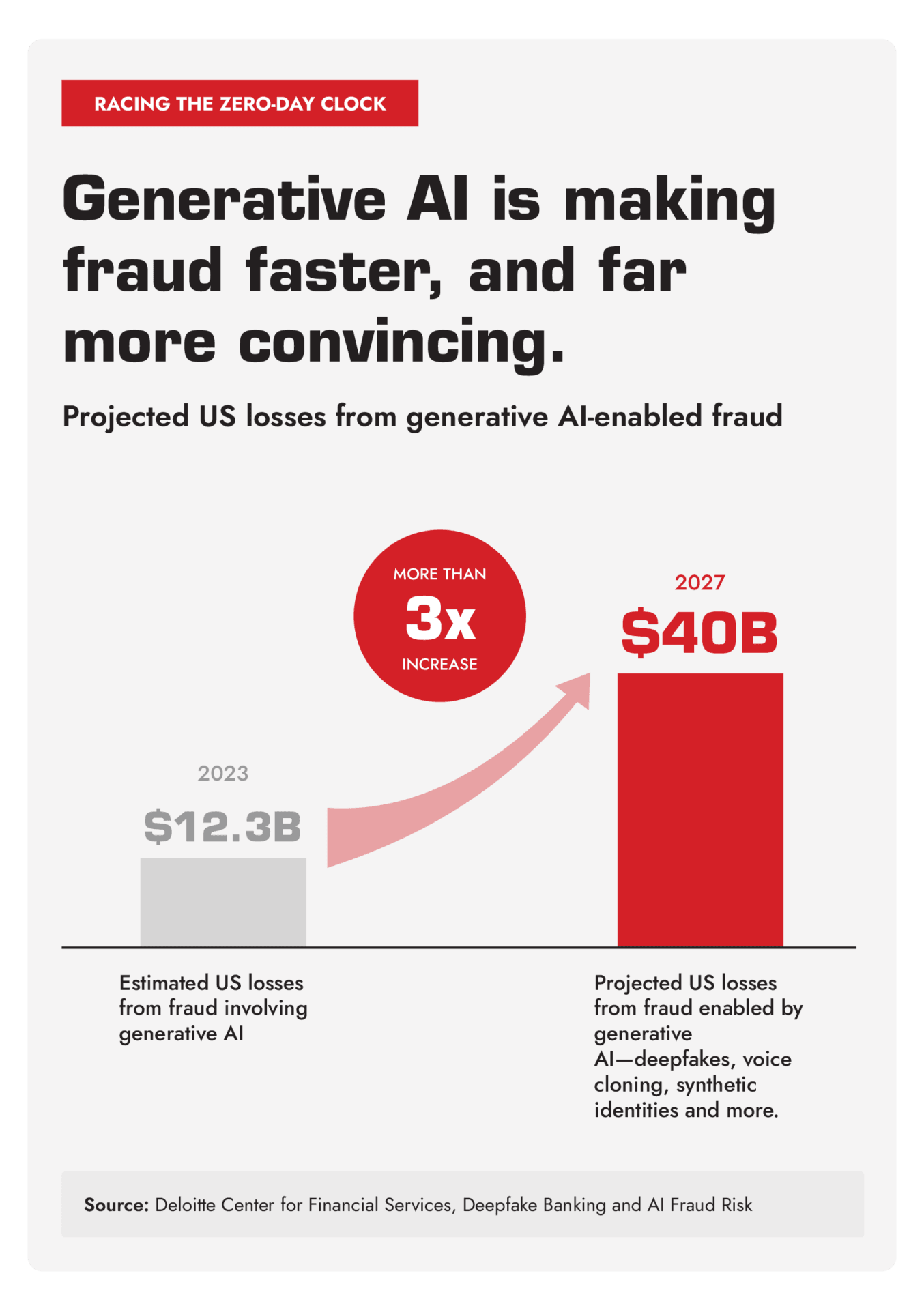
Executives don’t need to become experts in spotting a synthetic voice or a fabricated video call to defend against this category of fraud, and that’s a useful thing for a business leader to know before assuming employees need specialized training to keep up with it. Microsoft’s 2025 Digital Defense Report tracked a 195% global jump in AI-driven forgeries. Synthetic faces and voices are now convincing enough to get past selfie checks and liveness tests by faking the small physical cues, like a blink or a head turn, that those checks are built to catch. Deloitte’s Center for Financial Services projects that generative AI could enable fraud losses in the United States to reach $40 billion by 2027, up from $12.3 billion in 2023.
The response an employee needs is the same one that already defeats a text or an email built around impersonation: hang up, and call back on a number you already had before the request arrived, not one supplied in the message itself. That single habit works whether the voice on the other end belongs to a scammer reading from a script or a model trained to sound like someone’s boss.
Some businesses go a step further and set up a shared code word between executives and the employees who handle payments or account changes, a word or phrase confirmed in person or on a verified call, never sent by text or email, that a caller has to produce before an unusual request is treated as real. A business can apply the same idea to the handful of people whose requests carry real financial weight.
The MFA Request Nobody Asked For
Multifactor authentication is one of the most effective controls a business can put in place, which is exactly why attackers have built a tactic around exploiting how it’s used. CISA describes the technique, known as “MFA fatigue” or “push bombing,” as occurring when a cyber threat actor bombards a user with mobile application push notifications until the user either approves the request by accident or out of annoyance with the nonstop notifications. An attacker who already has a stolen password can generate hundreds of prompts on a target’s device in a short window, counting on fatigue or confusion to do what the stolen password alone could not.
CISA’s strongest recommendation is phishing-resistant MFA, but for organizations not yet there, it recommends number matching as an interim step, which requires a user to enter a number displayed on the identity platform into their app before an authentication request is approved. The employee behavior that matters just as much as the technology behind it is simple: an MFA prompt an employee did not generate themselves is not a system glitch to dismiss. It’s a sign that a password has likely already been compromised, and it should be denied and reported immediately, not approved to make the notifications stop.
Fraudulent QR Codes & Look-Alike Login Pages
QR codes have become common enough in daily business life, on flyers, invoices, and delivery notices, that few employees stop to consider where one actually leads before scanning it. The FBI and IC3 warned in 2025 that criminals have been sending unsolicited packages containing a QR code that prompts the recipient to provide personal and financial information or unwittingly download malicious software, often addressed to look like a legitimate delivery. The advisory’s guidance is direct: don’t scan QR codes from unknown origins, and take precautions before granting a scanned link permission to access phone functions, accounts, or apps.
The same caution applies to the login page a QR code or a link ultimately opens. A page that looks like a familiar vendor portal or a company single sign-on screen is only trustworthy if the web address matches what the employee already knows, not just the logo and layout on the page. Security awareness for employees on this point comes down to one habit: check the address bar before entering a password, every time, regardless of how convincing the page looks.
What Not to Share & with Whom
Pretexting rarely succeeds on the strength of a single conversation. More often, an attacker builds a plausible scenario across several small contacts: an email confirming a vendor’s name, a call asking when the CFO is traveling, a message asking which system handles payroll. None of it feels sensitive when it’s given, but combined, those details become the raw material for the kind of convincing impersonation covered earlier in this article.
The fix isn’t a blanket refusal to answer questions, which would make it impossible to do business. It’s a habit of pausing on requests for operational details — an org chart, a travel schedule, an invoice format, a system name — from anyone who hasn’t been verified through a channel the business already trusts, even when the request sounds routine. An employee who has been taught to notice that pattern is a meaningfully harder target than one who assumes every question deserves a helpful answer.
Closing the Loop: Reporting Without Hesitation
The previous article in this series looked at what a business needs on the technical side once an employee reports a suspected compromise: a documented plan, IT access ready to move, and a reporting policy CISA already treats as a baseline control. None of that matters if an employee who clicked the wrong link, answered the wrong call, or approved the wrong prompt hesitates to say so.
That hesitation is usually about fear of blame, not a lack of awareness. A business that treats a reported mistake as a problem to be solved, not a person to be reprimanded, gets told about incidents in minutes. A business that treats it as a performance issue gets told once the damage is already done, if at all. Making that distinction clear to employees, in writing and in practice, is as much a part of readiness as any technical control this series has covered.
Turning Employees into the Strongest Control You Have
None of the tactics covered in this article require an employee to become a cybersecurity expert. They require recognizing that a request looks unusual, verifying it through a channel the business already trusts, and reporting it the moment something feels off, whether the request arrived by email, text, phone call, or QR code, and whether the voice on the other end belongs to a person or a model built to sound like one.
Treating this as a once-a-year training obligation, rather than a habit built and reinforced continuously, leaves exactly the gap attackers, and the AI tools now sharpening their tactics, are counting on open for the rest of the year. Closing it now, while it’s a matter of building a habit rather than recovering from the cost of not having one, is the more strategic choice available to any business heading into next year.
Download the Checklist
📋 Download the Cybersecurity-Ready Team Checklist here, a practical rundown your team can use today to see exactly where those habits already hold up and where a gap still needs closing.
Most SMBs don’t have the internal bandwidth to design realistic phishing simulations, keep training current against tactics that keep changing, and reinforce a no-blame reporting culture on top of running the rest of the business. A technology partner that already does this work can help build that program, run it consistently, and make sure it reflects the tactics employees are actually facing today.
Cybersecurity: Builds phishing simulation and awareness programs matched to the tactics attackers are actually using.
Managed IT Services: Keeps training, MFA policy, and reporting procedures current without adding to your team’s workload.
AI Integration & Governance: Puts guardrails around how your business verifies identity as AI-enabled impersonation keeps getting harder to spot.
👉 If your organization is ready to make recognize, verify, report second nature for every employee, our team is ready to help you take the next step.